The biggest update: Lordicon 4.0
During the last year we have been working hard on a new library user experience. We felt the recent one wasn’t good enough.
The Lottie animation loaded too slowly, and there was a problem with understanding the interface, where we had too many elements on the deck.
That included hidden categories, lack of searching through all icons available, and hidden collections.
The current version is straightforward.
-

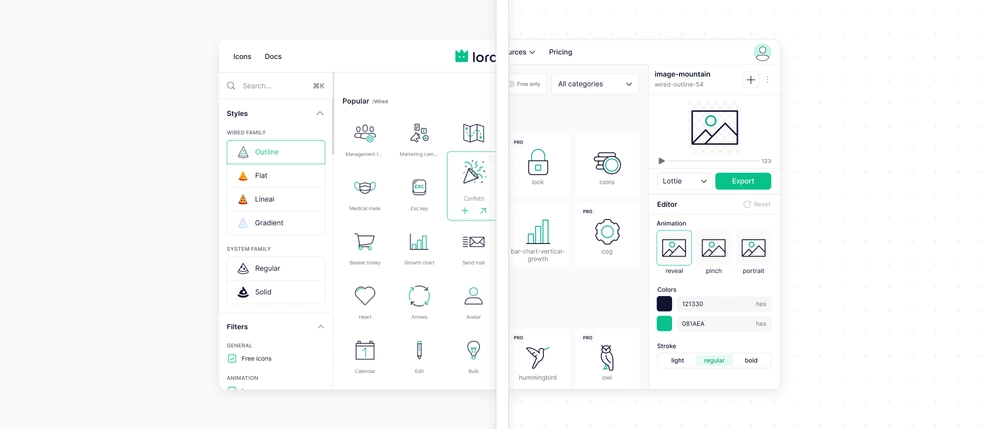
The top bar for searching new icons, either with all styles or a specific icon family and style.
-
Categories are in handy place as well, and they also got a sub categories, making it event simpler to navigate.
-
Collections now are available form the account menu, and simple toast after adding icon to a specific collection.
Infinite scrolling library
One of the biggest improvements in this update is the new infinite scrolling experience. Instead of jumping between pages and constantly interrupting your search, you can now seamlessly browse through the entire icon library in one continuous flow. It makes exploring different ideas, comparing icons, and discovering the right visual much faster and more natural.
New editor
The side editor also got a complete refresh. We removed unnecessary pop-ups and brought everything into one compact, easy-to-navigate panel.
Animation states are now clearly visible, making it easier to switch between different behaviors and instantly see how your icon responds.
Color customization is simpler too. You can enter HEX values directly without opening the color picker, while your saved colors are now conveniently available in a palette view.
We’ve also redesigned the advanced animation settings. Speed and delay controls are easier to understand, with a clearer preview of how each adjustment affects the final animation.
Export formats
Export formats have evolved as well. WebP, PNG Sprite, and PNG Sequence now support transparent backgrounds, giving you even more flexibility when bringing Lordicons into your projects.
At the same time, we’re simplifying our export options. HTML Embed has become a niche format while requiring significant resources to host, so it’s no longer available to new users. Existing users will be able to create HTML Embeds until the end of 2026, and anything you’ve already embedded will continue to be hosted and work on your websites until December 31st, 2030.
For better performance and more flexibility, we recommend switching to our Custom Element or Lottie integrations.
Keyboard shortcuts
Keyboard shortcuts are here to make working with Lordicon faster and smoother. You can now search the library, navigate between icons, add icons to collections, play or pause animations, export, reset, and more — all without reaching for your mouse.
And that’s only part of it. Lordicon 4.0 includes hundreds of smaller improvements across the entire experience.

Was this article helpful?



Sorry to hear that. How can we improve this article?